One Test, Many Cases
Most functions need the same check for many inputs: normal values, negative values, zero, edge cases. Copying the test five times makes five places to maintain.
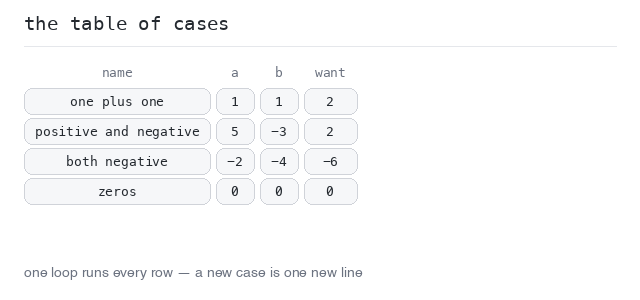
The usual answer is a table-driven test: put the cases into an array of objects — each case holds a name, the inputs and the expected output — and run one loop over them.
Adding a new case becomes one new line in the table. This is the most common test pattern you will see in real code.
The Table
The table is an array of objects with a named type, written right next to the test. Each entry is one case: a name (for the failure message), the inputs, and the expected result.
The loop calls the function once per case and compares the result. The first mismatch throws and ends the test, so the message carries the case name — that is how you know which row broke.
Four cases in one table
Four cases, one loop, one check. All pass here, so the run prints a single ✔ add over the table line. To test a fifth situation you would add one line to the table — the loop stays untouched.
Output: TypeScript file and captured output
import { test } from "node:test"
import assert from "node:assert/strict"

function add(a: number, b: number): number {
  return a + b
}

type Case = {
  name: string
  a: number
  b: number
  want: number
}

const cases: Case[] = [
  { name: "one plus one", a: 1, b: 1, want: 2 },
  { name: "positive and negative", a: 5, b: -3, want: 2 },
  { name: "both negative", a: -2, b: -4, want: -6 },
  { name: "zeros", a: 0, b: 0, want: 0 }
]

test("add over the table", () => {
  for (const c of cases) {
    const got = add(c.a, c.b)
    assert.equal(got, c.want, `${c.name}: add(${c.a}, ${c.b}) = ${got}; want ${c.want}`)
  }
})
Subtests
Calling t.test(name, fn) inside a test turns each table case into its own subtest. The outer test function receives the test context t as its argument, and each case is awaited so it finishes before the next one starts.
The case names now show up in the output, indented under the parent test, each with its own ✔ or ✖. That makes a broken case easy to spot in a long table.
Every case gets a name
The same table, wrapped in t.test. The output now lists all four cases separately under ▶ add, and the summary counts five tests: the parent plus its four subtests.
Output: TypeScript file and captured output
import { test } from "node:test"
import assert from "node:assert/strict"

function add(a: number, b: number): number {
  return a + b
}

type Case = {
  name: string
  a: number
  b: number
  want: number
}

const cases: Case[] = [
  { name: "one plus one", a: 1, b: 1, want: 2 },
  { name: "positive and negative", a: 5, b: -3, want: 2 },
  { name: "both negative", a: -2, b: -4, want: -6 },
  { name: "zeros", a: 0, b: 0, want: 0 }
]

test("add", async (t) => {
  for (const c of cases) {
    await t.test(c.name, () => {
      const got = add(c.a, c.b)
      assert.equal(got, c.want, `add(${c.a}, ${c.b}) = ${got}; want ${c.want}`)
    })
  }
})
Run One Case Alone
Tests can be picked from the command line by name with --test-name-pattern:
node --test --test-reporter=spec --test-name-pattern 'both negative'
The pattern is matched against the name of each registered test. A subtest cannot be selected on its own — when the parent test does not match, nothing inside it runs — so for this to work each case gets its own top-level test(…) call with the case name in it.
This is perfect while fixing one broken case: rerun just that case until it is green, then run everything again.
Filter by name
The table is registered as four separate tests, named add: one plus one and so on. Run with the pattern both negative, only one of the four executes — the summary says tests 1.
Output: TypeScript file and captured output
import { test } from "node:test"
import assert from "node:assert/strict"

function add(a: number, b: number): number {
  return a + b
}

type Case = {
  name: string
  a: number
  b: number
  want: number
}

const cases: Case[] = [
  { name: "one plus one", a: 1, b: 1, want: 2 },
  { name: "positive and negative", a: 5, b: -3, want: 2 },
  { name: "both negative", a: -2, b: -4, want: -6 },
  { name: "zeros", a: 0, b: 0, want: 0 }
]

// One top-level test per case, so a name pattern can pick out a single one.
for (const c of cases) {
  test(`add: ${c.name}`, () => {
    const got = add(c.a, c.b)
    assert.equal(got, c.want, `add(${c.a}, ${c.b}) = ${got}; want ${c.want}`)
  })
}