What It Is
The Adapter pattern makes a class with the wrong interface fit the interface your code expects — like a travel plug between a foreign socket and your charger.
You cannot change the old class (it comes from a library, or other code depends on it). So you wrap it in a small class that implements the interface you need and translates the calls.
Example: An Old Printer as a Logger
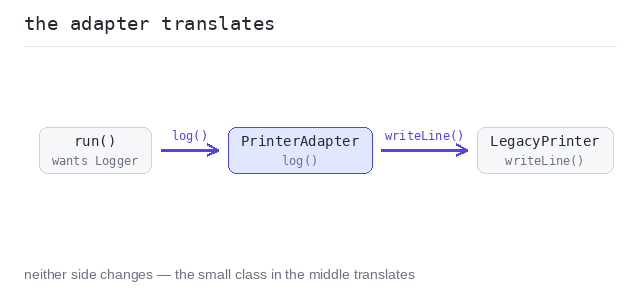
Our code wants a Logger with log(message). The legacy class only offers writeLine(prefix, text). The adapter holds the old object and translates one call into the other.
The adapter translates the call
run() works with any Logger; the adapter makes the legacy printer one of them without touching its code. Both printed lines start with LOG | — that prefix is supplied by the adapter, not by the caller.
Output: TypeScript file and captured output
// The interface our code expects.
interface Logger {
  log(message: string): void
}

// An old library class with a different method — we cannot change it.
class LegacyPrinter {
  writeLine(prefix: string, text: string): void {
    console.log(prefix + " | " + text)
  }
}

// The adapter makes the old class fit the interface we need.
class PrinterAdapter implements Logger {
  private legacy: LegacyPrinter

  constructor(legacy: LegacyPrinter) {
    this.legacy = legacy
  }

  log(message: string): void {
    this.legacy.writeLine("LOG", message)
  }
}

function run(logger: Logger): void {
  logger.log("service started")
  logger.log("request handled")
}

run(new PrinterAdapter(new LegacyPrinter()))
When to Use It
Use it when working code and a needed interface do not match, and you cannot (or should not) change either side — third-party libraries, legacy code, generated code.
Skip it when you own both sides — then just change one of them to match. An adapter between two classes you control is a workaround for a decision you could simply make.
Pros and Cons
Pros: old and new code cooperate without changes to either; the translation lives in one small, testable class.
Cons: one more hop to read through; many adapters stacked on each other are a sign the interfaces themselves need rework.