One Test, Many Cases
Most functions need the same check for many inputs: normal values, negative values, zero, edge cases. Copying the test five times makes five places to maintain.
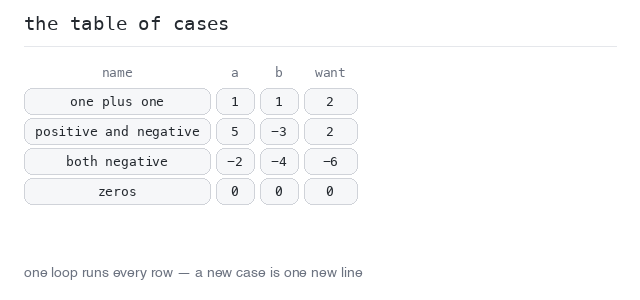
The answer is a table-driven test: put the cases into a list of tuples — each case holds a name, the inputs and the expected output — and run the same check over all of them.
Adding a new case becomes one new line in the table. This is one of the most common test patterns you will see in real code.
The Table
The simplest table is a list of tuples right inside the test. Each entry is one case: a name (for the failure message), the inputs, and the expected result.
The loop calls the function once per case and compares the result. The first mismatch would stop the test at that case, and the message carries the case name — that is how you know which row broke.
Four cases in one table
Four cases, one loop, one check. All pass here, so the run shows a single passing test. To test a fifth situation you would add one line to the table — the loop stays untouched.
Output: complete Python program
def add(a, b):
  return a + b

def test_add():
  cases = [
    ("one plus one", 1, 1, 2),
    ("positive and negative", 5, -3, 2),
    ("both negative", -2, -4, -6),
    ("zeros", 0, 0, 0),
  ]
  for name, a, b, want in cases:
    got = add(a, b)
    assert got == want, f"{name}: add({a}, {b}) = {got}; want {want}"
One Test per Case with parametrize
pytest can turn each table row into its own test: the @pytest.mark.parametrize decorator takes the argument names and the list of cases, and calls the test function once per row.
The ids list gives each case its name. The names now appear in the pytest -v output, like test_add[both_negative]. Each case passes or fails on its own, so a broken row is easy to spot in a long table — and the rows after it are still checked.
Every case gets a name
The same table, written as parametrize cases. The verbose output now lists all four cases separately — you can see exactly which cases ran and passed, and the summary says 4 passed.
Output: complete Python program
import pytest

def add(a, b):
  return a + b

@pytest.mark.parametrize("a, b, want", [
  (1, 1, 2),
  (5, -3, 2),
  (-2, -4, -6),
  (0, 0, 0),
], ids=["one_plus_one", "positive_and_negative", "both_negative", "zeros"])
def test_add(a, b, want):
  assert add(a, b) == want
Run One Case Alone
Cases can be selected from the command line with -k, which matches against the test name and the case id:
pytest -v -k "both_negative"
Only the matching case runs; the others are deselected, not even started. This is perfect while fixing one broken case: rerun just that case until it is green, then run everything again.
Filter with -k
The same file as above, run with -k "both_negative". Only one of the four cases executes — the header counts 3 deselected and 1 selected, and the summary says 1 passed, 3 deselected.
Output: complete Python program
import pytest

def add(a, b):
  return a + b

@pytest.mark.parametrize("a, b, want", [
  (1, 1, 2),
  (5, -3, 2),
  (-2, -4, -6),
  (0, 0, 0),
], ids=["one_plus_one", "positive_and_negative", "both_negative", "zeros"])
def test_add(a, b, want):
  assert add(a, b) == want