Retrieving Collection Parts
Sometimes you do not need a whole list. You need a part of it: a range of elements, the first or last few, pieces of equal size, or a moving window of neighbours.
Python has one syntax for most of this: the slice. words[low:high] gives the elements from index low up to, but not including, index high. Leave out low to start at the beginning, or leave out high to go to the end. A negative index counts back from the end, and a third number sets a step.
s[low:high]— from indexlowup to, but not including,highs[:n]— the firstnelementss[n:]— everything from indexnto the ends[-n:]— the lastnelementss[::2]— every second element
A slice always builds a new list and copies the chosen elements into it. Changing the copy does not change the original, and changing the original does not change the copy. In some other languages the same operation gives a view that shares memory with the original — in Python it never does.
For the jobs a slice cannot do on its own, this lesson uses functions from the itertools module and a small helper function or two.
Most examples on this page use the same data: the words one two three four five six.
Slice
Slicing means taking the elements at some chosen positions.
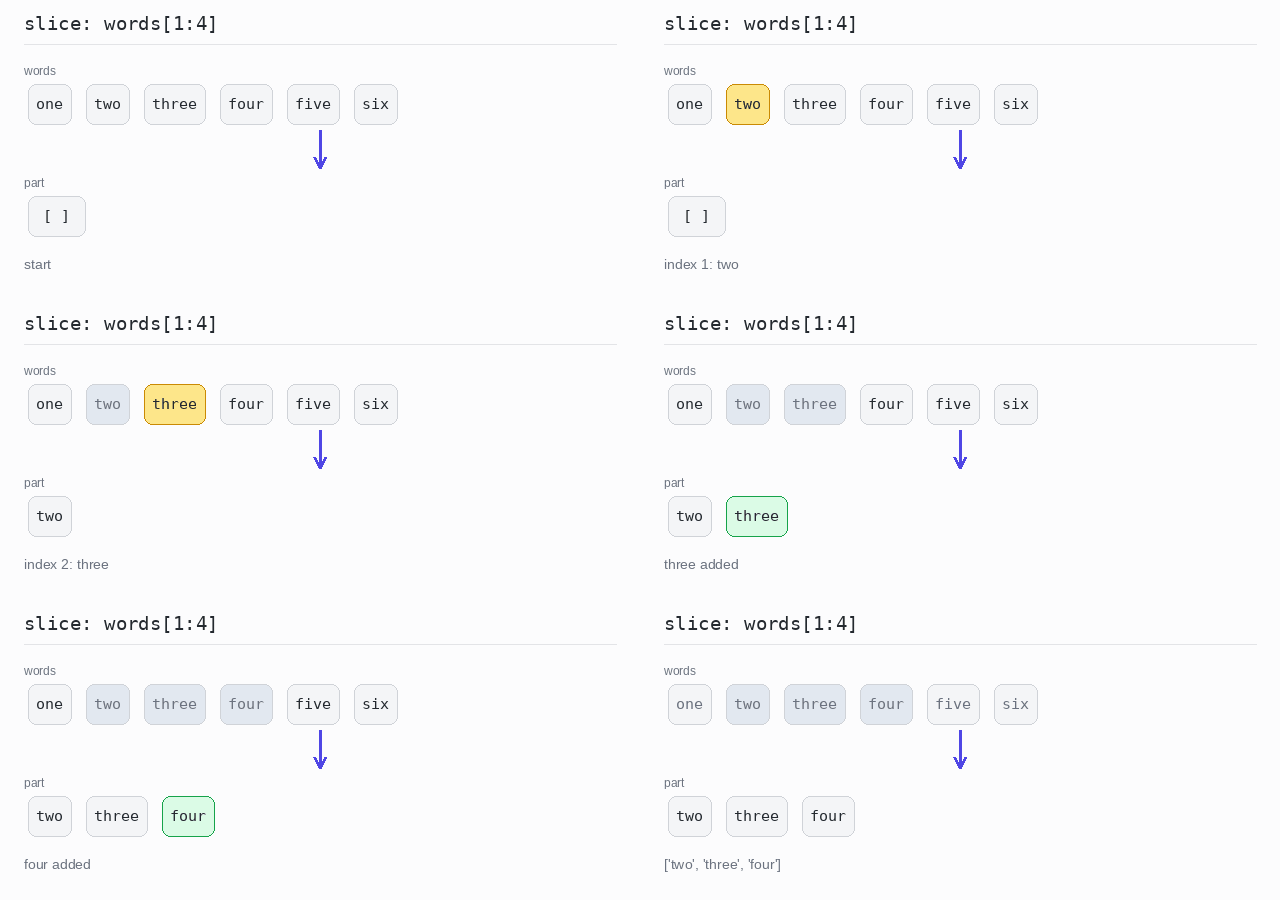
For a run of neighbouring positions, use a slice: words[1:4] gives the elements at indexes 1, 2 and 3. Remember that the end index is excluded: to get the elements at indexes 1 to 3 you write 1:4.
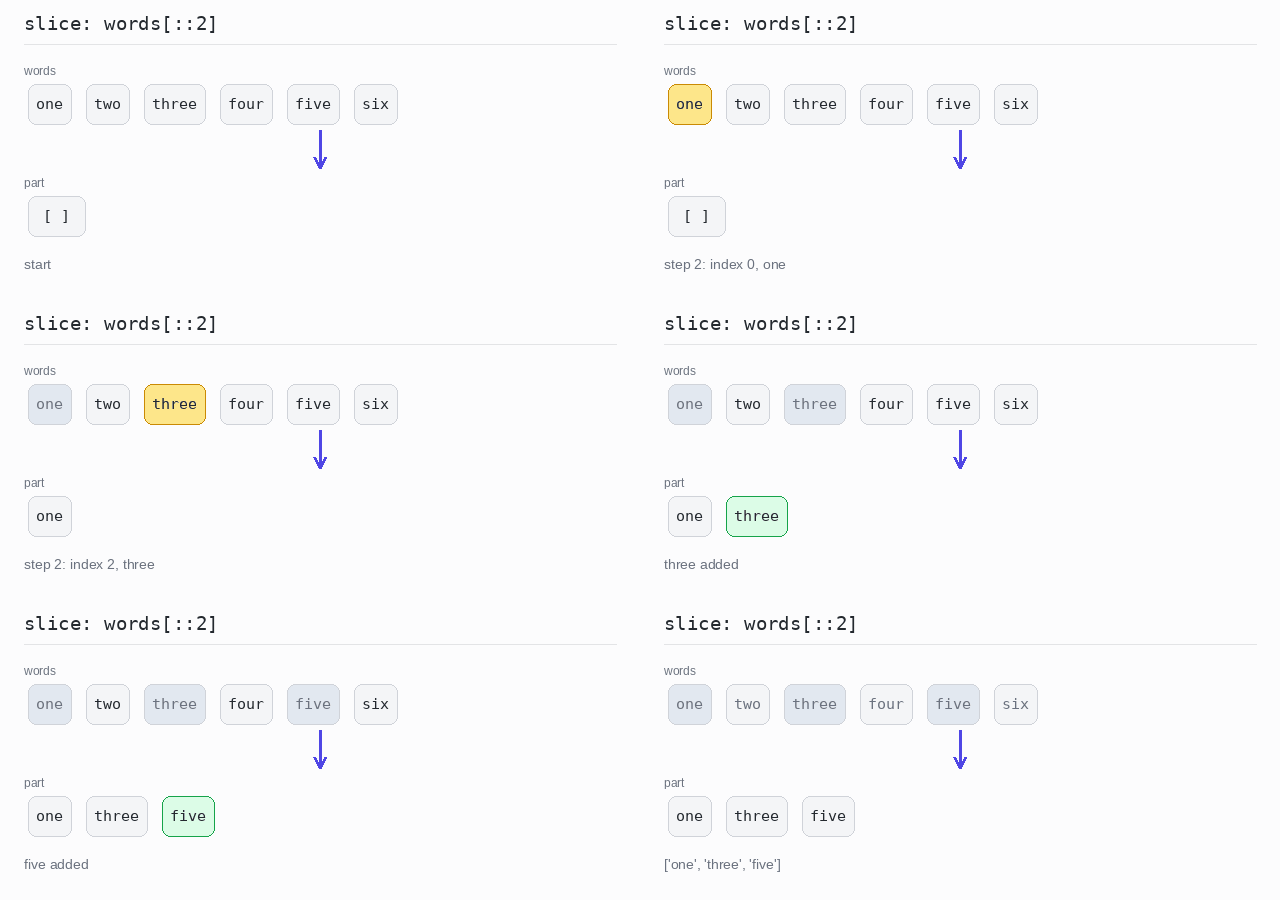
A slice can even skip elements: the third number is the step, so words[::2] takes every second element. For positions you list yourself, in your own order, use a list comprehension over a list of indexes.
Slice a range
words[1:4] starts at index 1 and stops before index 4. The result has 3 elements: ['two', 'three', 'four']. It is a new list, so a change to it would not touch words.
Output: complete Python program
words = ["one", "two", "three", "four", "five", "six"]

# indexes 1, 2 and 3 - the end index 4 is not included
part = words[1:4]

print(part)
Slice with a step
The slice words[::2] has an empty start and end, so it covers the whole list, and the step 2 takes every second element: indexes 0, 2 and 4. No loop is needed — the step is part of the slice syntax.
Output: complete Python program
words = ["one", "two", "three", "four", "five", "six"]

# the third slice number is the step: every second element
part = words[::2]

print(part)
Slice by a list of indices
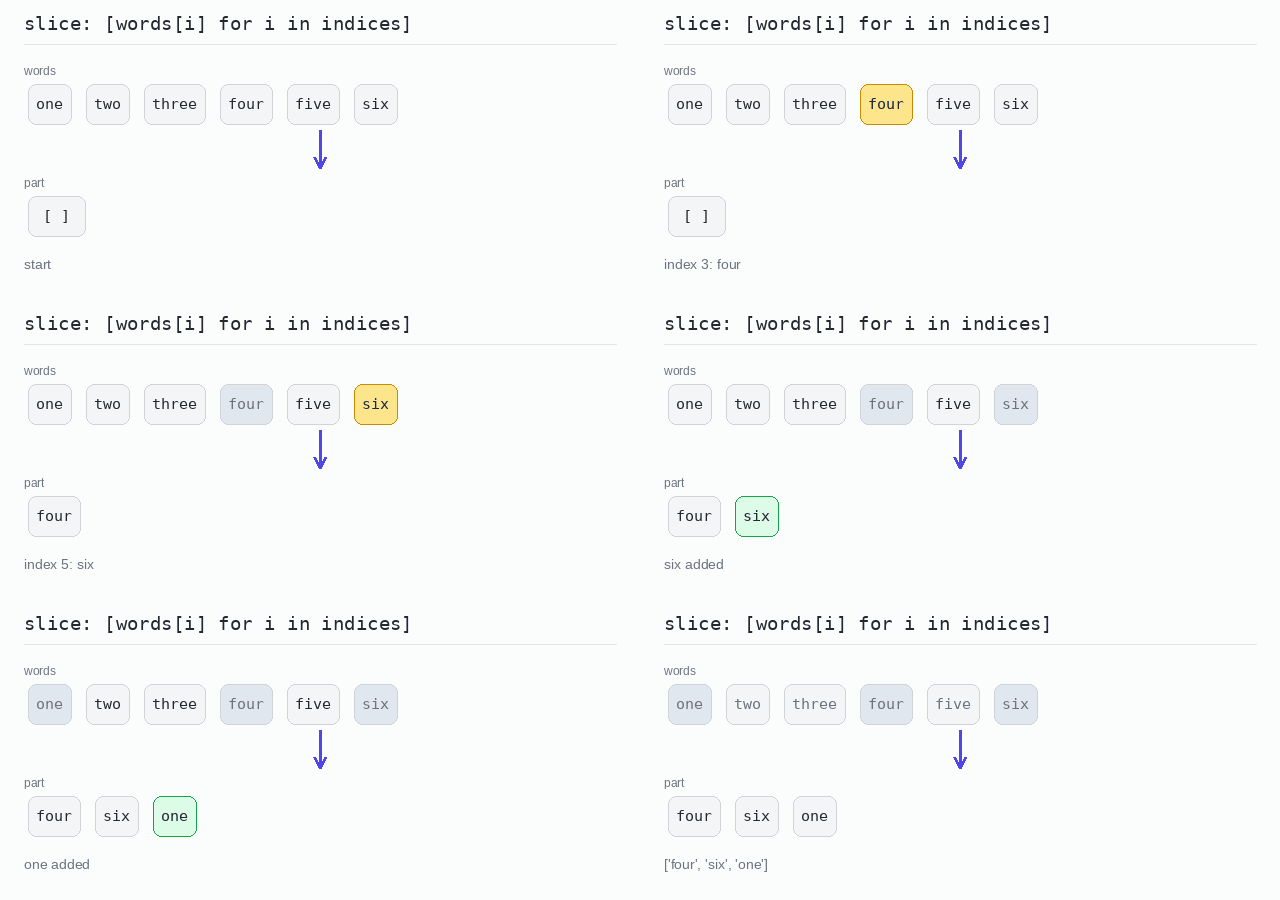
The positions 3, 5 and 0 are stored in a list of numbers. The comprehension picks the word at each position, so the result comes out in the order of the indexes.
Output: complete Python program
words = ["one", "two", "three", "four", "five", "six"]
indices = [3, 5, 0]

# pick the elements at the given positions, in that order
part = [words[i] for i in indices]

print(part)
Take and Drop
Take means keep a number of elements from one end. Drop means throw away a number of elements from one end and keep the rest.
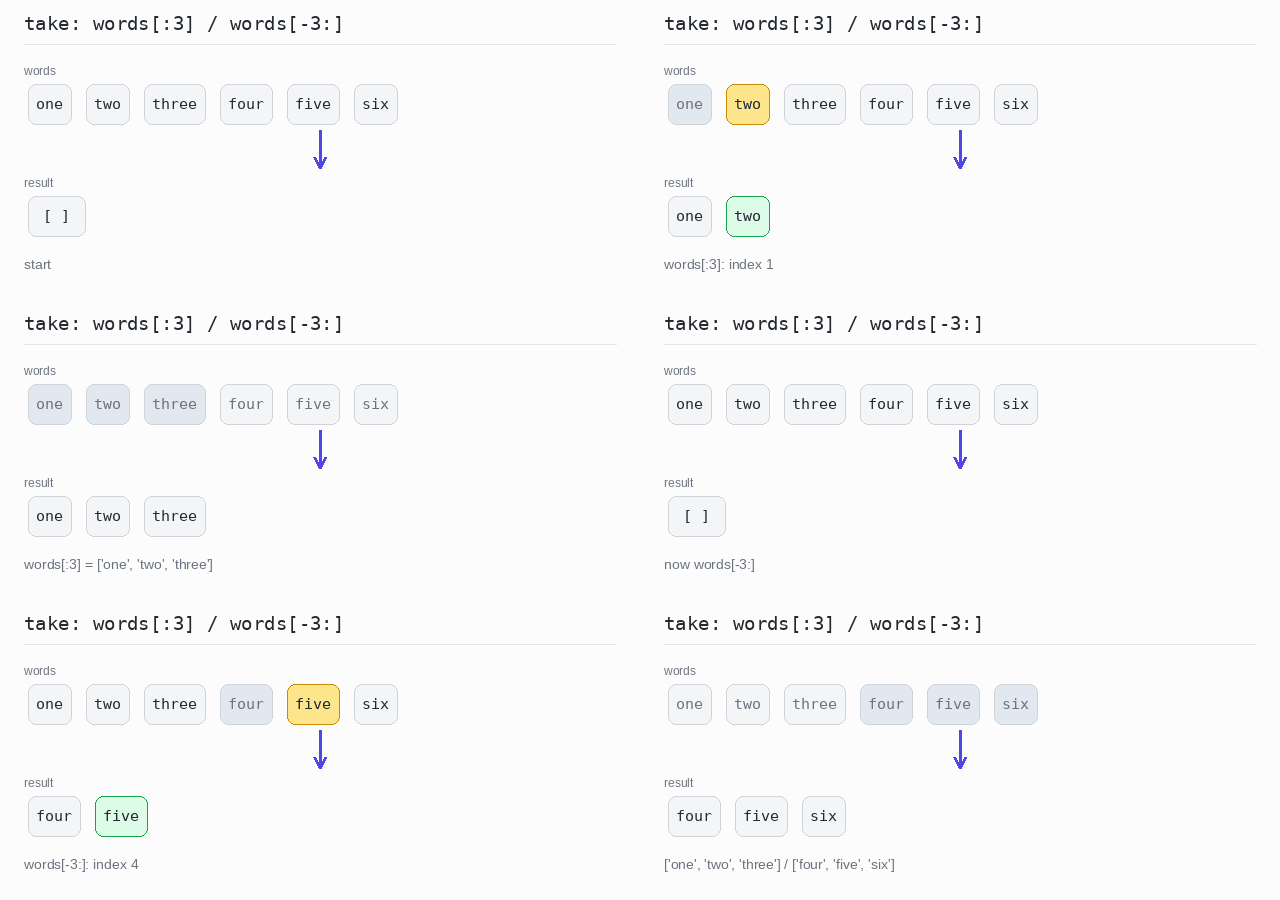
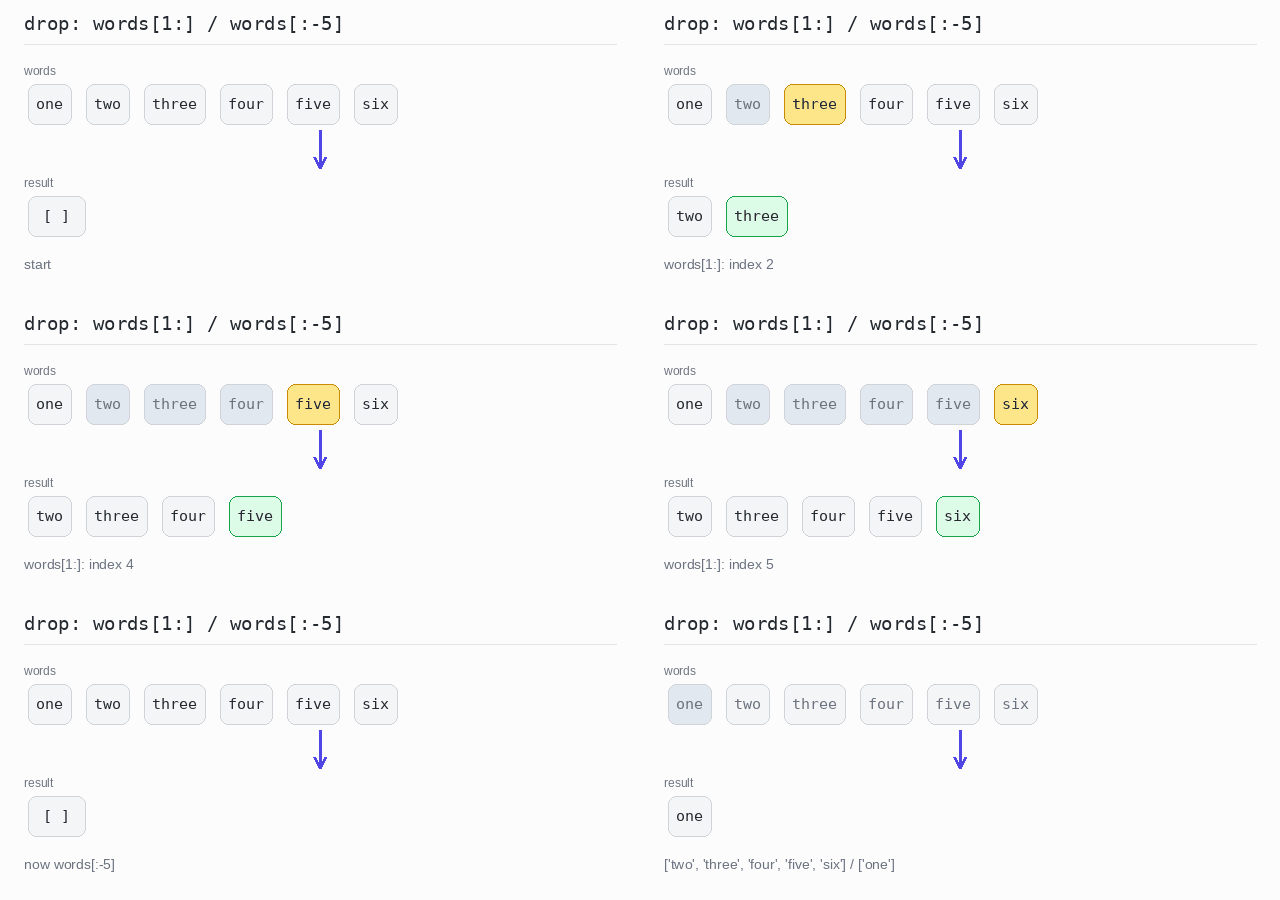
Both are slices in Python. words[:3] takes the first 3 elements and words[-3:] takes the last 3. words[1:] drops the first element and words[:-5] drops the last 5.
There are also conditional versions. These do not count elements: they walk from one end and stop at the first element that fails a condition. Python has them built in, in the itertools module: takewhile() keeps elements from the start while a condition holds, and dropwhile() skips elements while it holds and keeps the rest. Both return a lazy iterator, so wrap the call in list() to see the elements. For the same jobs from the end of the list there is no built-in: run the function over reversed(words) and turn the result back around with [::-1].
Take the first or last n elements
words[:3] keeps the first 3 words. words[-3:] keeps the last 3, because a negative index counts back from the end.
Output: complete Python program
words = ["one", "two", "three", "four", "five", "six"]

first3 = words[:3]  # the first 3 elements
last3 = words[-3:]  # the last 3 elements

print(first3)
print(last3)
Drop the first or last n elements
words[1:] skips the first word. words[:-5] skips the last 5 words, so only one is left.
Output: complete Python program
words = ["one", "two", "three", "four", "five", "six"]

without_first = words[1:]   # drop the first element
without_last5 = words[:-5]  # drop the last 5 elements

print(without_first)
print(without_last5)
Take while a condition holds
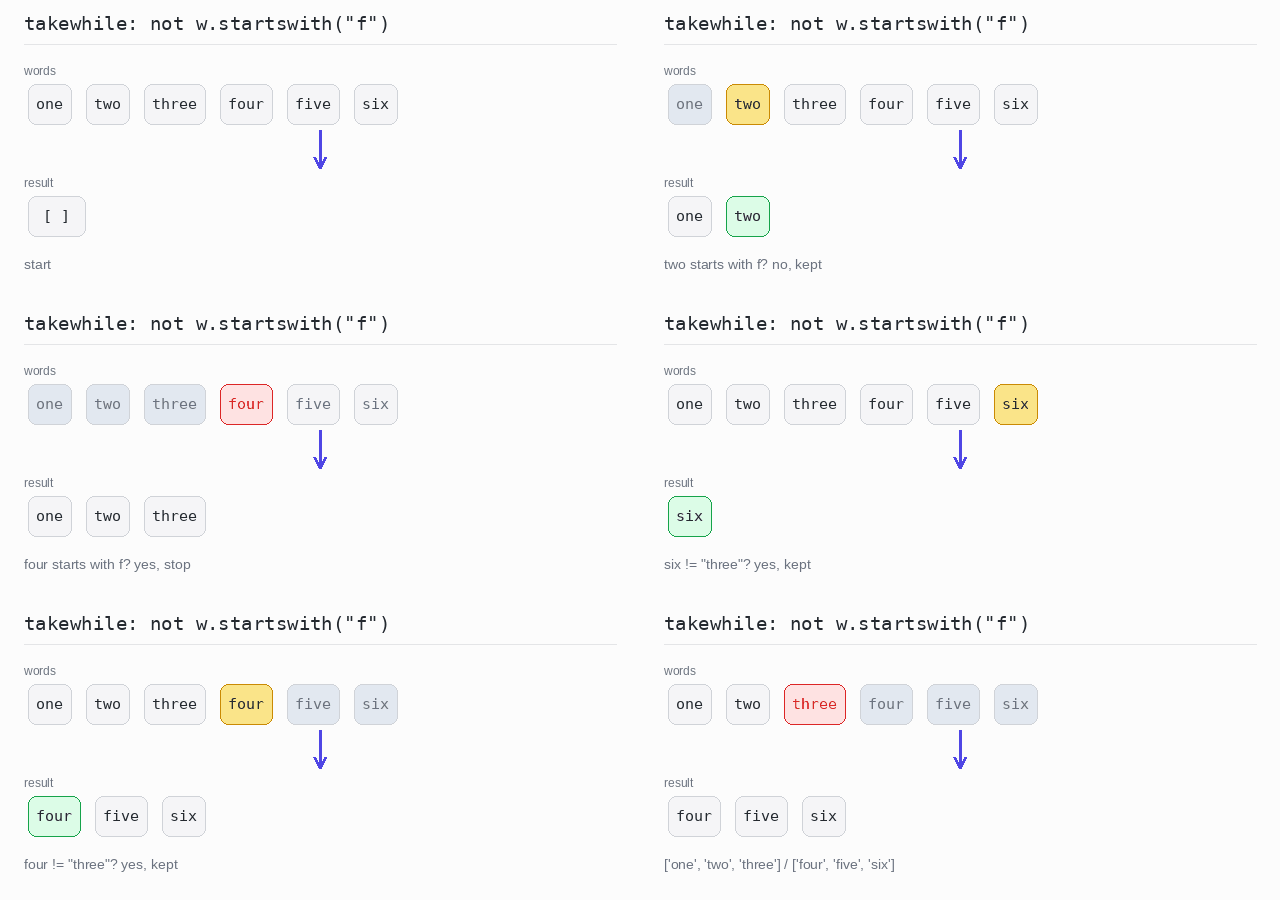
takewhile() keeps words from the start until it meets a word that starts with f. The condition is a lambda, a small nameless function, and startswith() checks the start of a string. For the end of the list, takewhile() runs over reversed(words) — it keeps words until it meets three — and [::-1] turns the result back around.
Output: complete Python program
from itertools import takewhile

words = ["one", "two", "three", "four", "five", "six"]

# keep from the start while the word does not start with "f"
from_start = list(takewhile(lambda w: not w.startswith("f"), words))

# the same from the end: walk the reversed list, then turn the result back
from_end = list(takewhile(lambda w: w != "three", reversed(words)))[::-1]

print(from_start)
print(from_end)
Drop while a condition holds
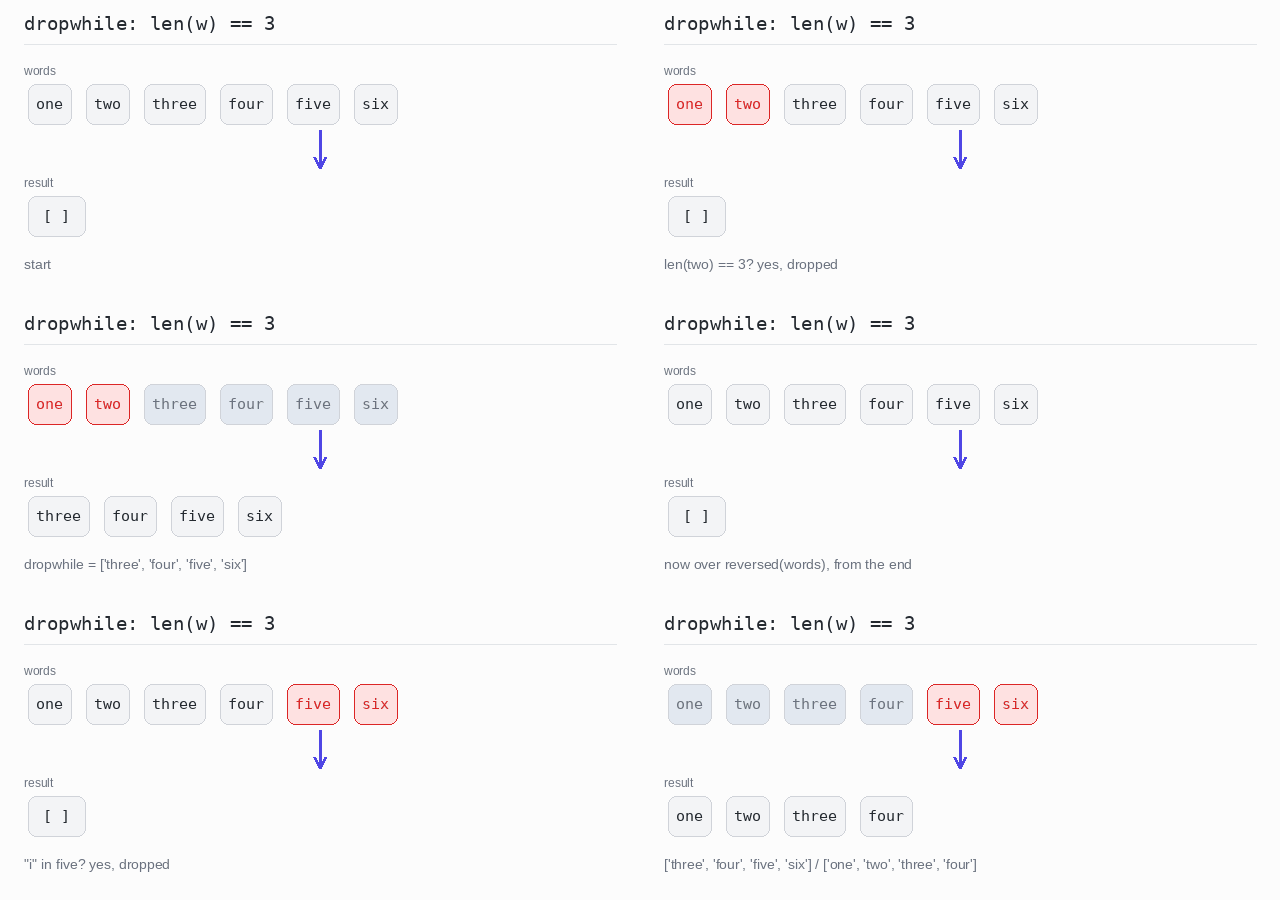
dropwhile() skips the 3-letter words at the start and keeps everything from three on. The same trick with reversed() skips words from the end while they contain the letter i. The in operator checks whether a string holds a piece of text.
Output: complete Python program
from itertools import dropwhile

words = ["one", "two", "three", "four", "five", "six"]

# skip from the start while the word has 3 letters, keep the rest
from_start = list(dropwhile(lambda w: len(w) == 3, words))

# the same from the end: walk the reversed list, then turn the result back
from_end = list(dropwhile(lambda w: "i" in w, reversed(words)))[::-1]

print(from_start)
print(from_end)
Chunked
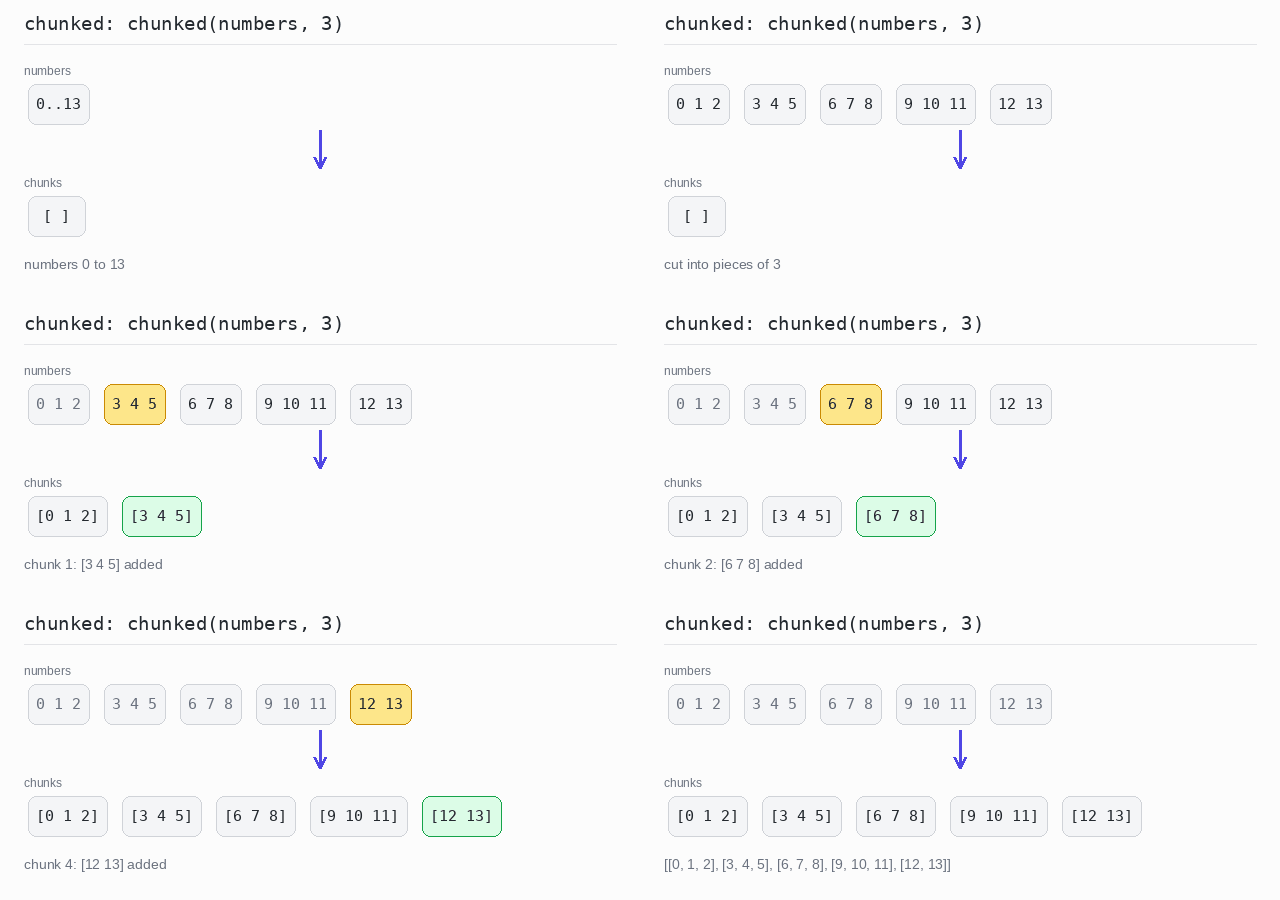
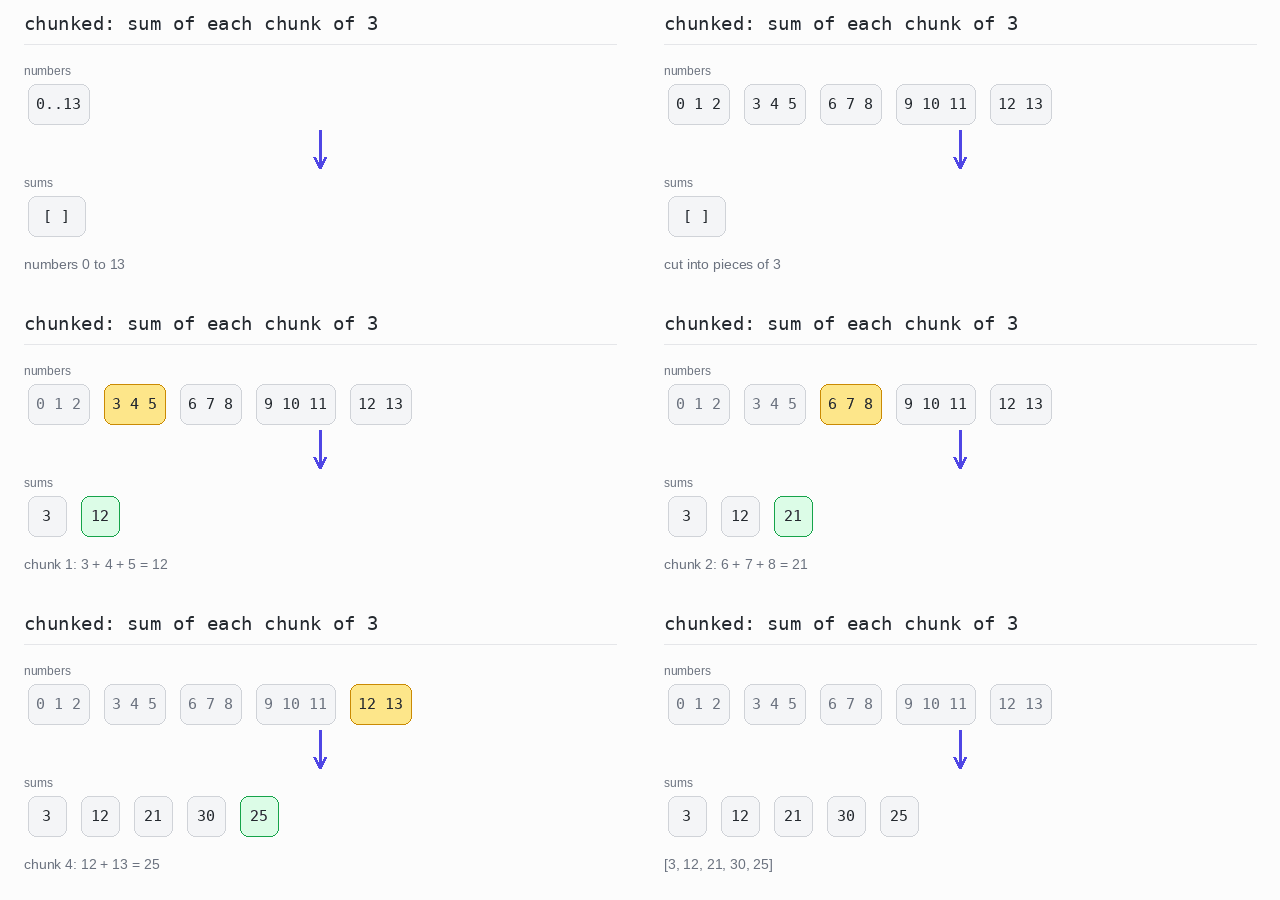
Chunking means cutting a list into pieces of the same size. The last piece may be shorter when the elements do not divide evenly.
This version of Python has no built-in chunk function (newer versions add itertools.batched()), but the helper is one line: range(0, len(items), size) gives the starting indexes 0, 3, 6, … and a slice cuts one piece from each. A slice never reads past the end of the list, so the short last piece comes out right on its own.
The result is a list of lists, and every piece keeps its own brackets: [[0, 1, 2], [3, 4, 5], …].
To work on each piece right away, put the chunks in a comprehension.
Split into chunks of 3
The numbers 0 to 13 are cut into pieces of 3. The last piece has only 2 elements: [12, 13].
Output: complete Python program
def chunked(items, size):
  # one slice per piece: the starts are 0, size, 2*size, ...
  return [items[i:i + size] for i in range(0, len(items), size)]

numbers = list(range(14))

chunks = chunked(numbers, 3)

print(chunks)
Sum each chunk
The same chunks, but each one is added up with the built-in sum(). Only the sums are kept: [3, 12, 21, 30, 25].
Output: complete Python program
def chunked(items, size):
  return [items[i:i + size] for i in range(0, len(items), size)]

numbers = list(range(14))

# add up each chunk of 3, keep only the sums
sums = [sum(chunk) for chunk in chunked(numbers, 3)]

print(sums)
Windowed
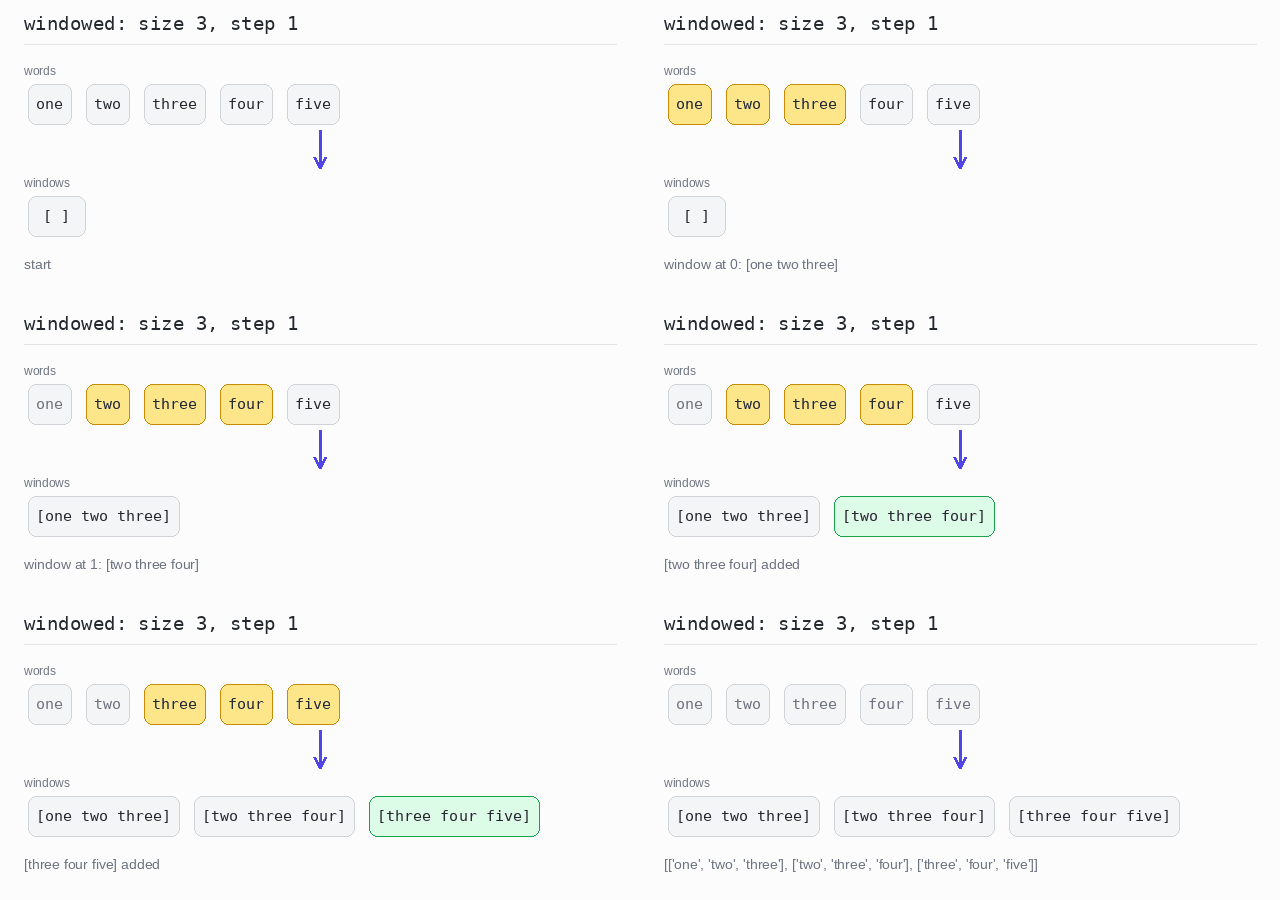
A window is a group of neighbouring elements. Windowing slides the group along the list and collects every position. Unlike chunks, windows overlap.
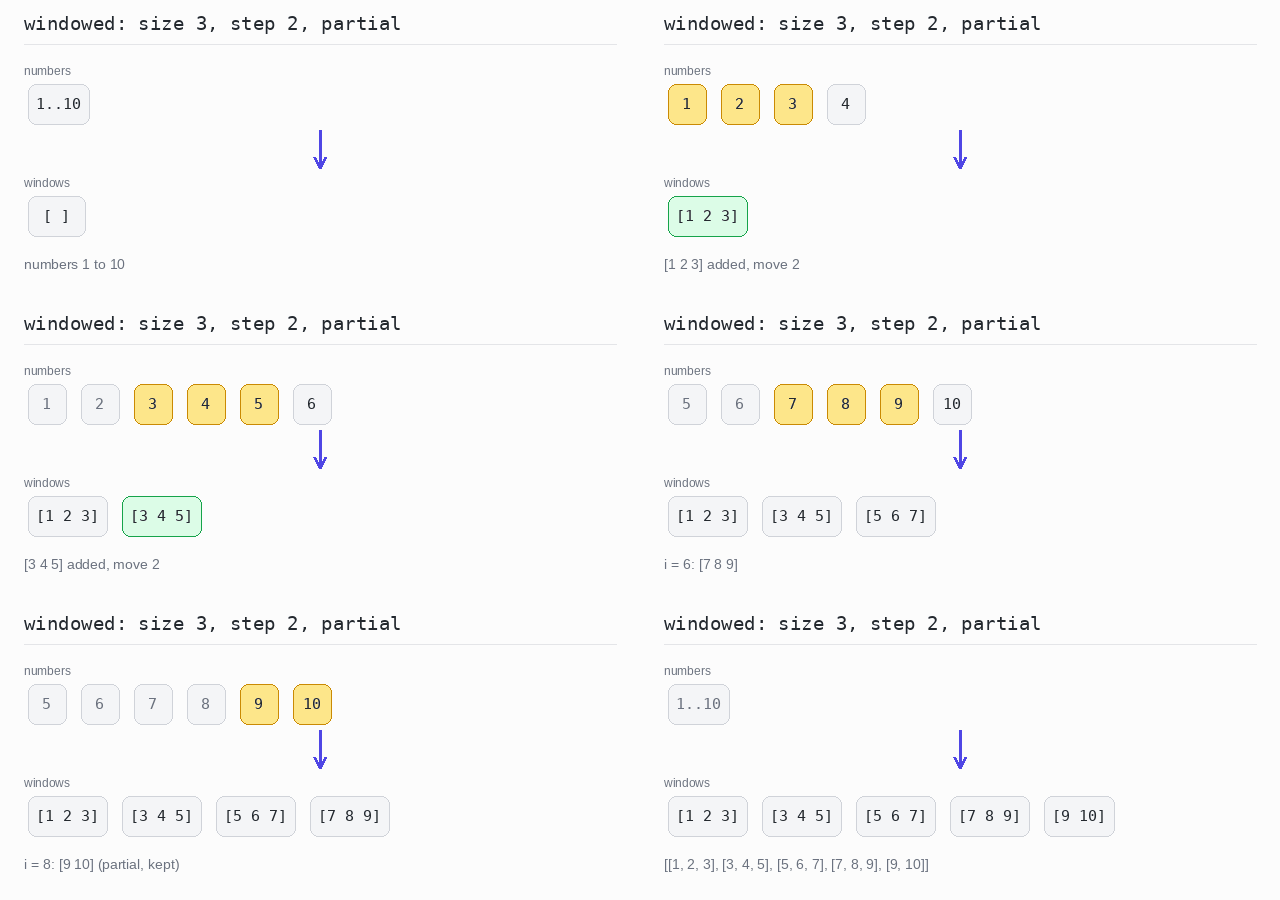
Python has no built-in windowed. A comprehension with items[i:i + size] does it, and a small windowed helper makes it reusable. With a step, the window moves several positions at a time. With partial set to True, a shorter window at the end is kept instead of being thrown away.
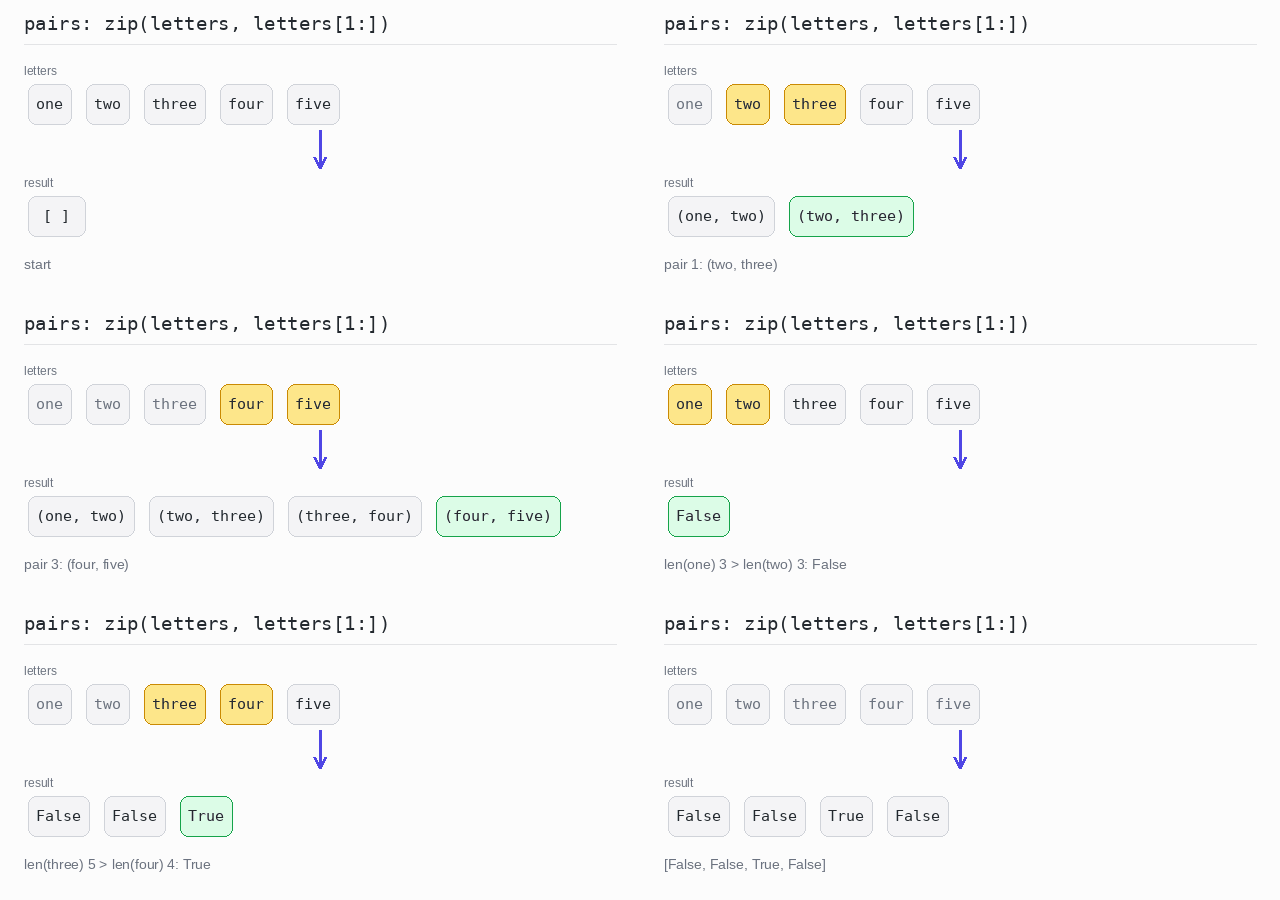
A window of 2 that moves 1 step is the same as pairing each element with the next one. In Python that is the classic idiom zip(words, words[1:]) — and the itertools module has it ready-made as pairwise().
Windows of 3
The window has 3 words and moves 1 position each time. range(len(items) - size + 1) stops when a full window no longer fits, so there are 3 windows. The result is a list of lists, printed on one line.
Output: complete Python program
def windowed(items, size):
  # every group of size neighbours, moving one position at a time
  return [items[i:i + size] for i in range(len(items) - size + 1)]

words = ["one", "two", "three", "four", "five"]

print(windowed(words, 3))
Windows with a step and partial windows
The window has 3 numbers and moves 2 positions each time. Because partial is True, the last window [9, 10] is kept even though it is short.
Output: complete Python program
def windowed(items, size, step=1, partial=False):
  result = []
  for i in range(0, len(items), step):
    window = items[i:i + size]
    if len(window) < size and not partial:
      break
    result.append(window)
  return result

numbers = list(range(1, 11))

print(windowed(numbers, 3, step=2, partial=True))
Sum each window
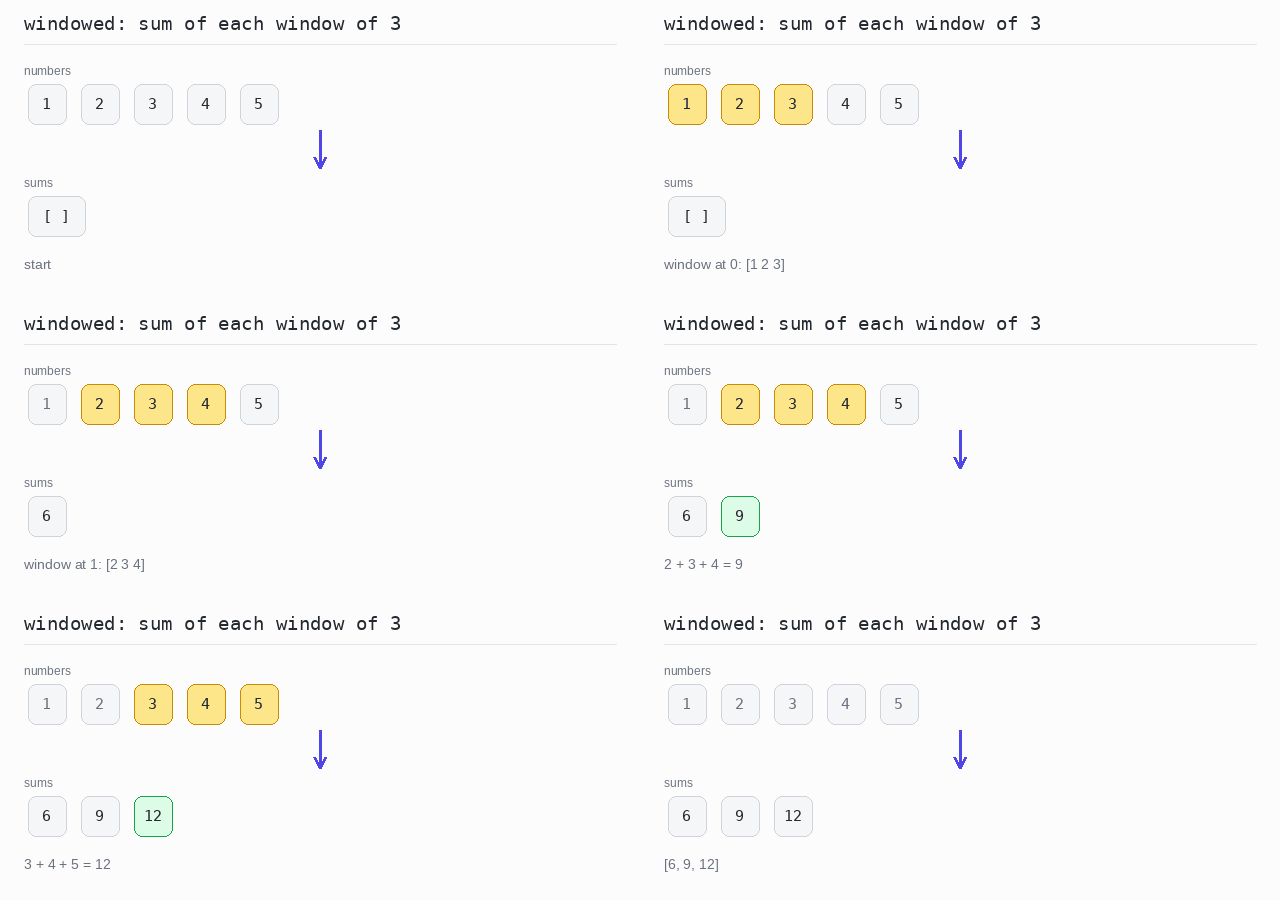
Every window of 3 neighbours is added up with sum(). Only the sums are kept: [6, 9, 12].
Output: complete Python program
numbers = [1, 2, 3, 4, 5]

# add up every window of 3 neighbours, keep only the sums
sums = [sum(numbers[i:i + 3]) for i in range(len(numbers) - 2)]

print(sums)
Pair each element with the next one
zip(letters, letters[1:]) pairs each word with its neighbour. Each pair is a tuple, printed in round brackets: ('one', 'two'). itertools.pairwise() gives the same pairs ready-made; here it feeds a comprehension that records whether the first word is longer than the second.
Output: complete Python program
from itertools import pairwise

letters = ["one", "two", "three", "four", "five"]

# each element together with the one after it, as tuples
pairs = list(zip(letters, letters[1:]))
print(pairs)

# the same neighbours from itertools.pairwise, compared by length
longer = [len(a) > len(b) for a, b in pairwise(letters)]
print(longer)