Cut the Problem in Half
O(log n) means logarithmic time: every step cuts the remaining work in half. Because halving shrinks numbers so fast, doubling the input adds only one extra step.
16 elements need 4 halvings, 32 elements need 5, a million elements about 20, a billion about 30. That is why logarithmic algorithms feel instant even on huge data.
The classic example is binary search — but it only works on sorted data. Halving needs an order to know which half to throw away.
A Halving Loop
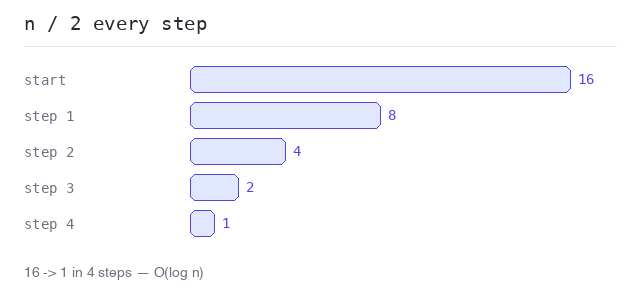
The simplest way to see O(log n) is a loop that divides n by 2 until it reaches 1. The number of rounds is the logarithm of n: for n = 16 the loop runs 4 times, because 2 · 2 · 2 · 2 = 16.
Halving until one remains
16 becomes 8, 4, 2, 1 — four steps. Doubling n to 32 would add just one more step.
Output: PHP script
<?php

$n = 16;
$steps = 0;

while ($n > 1) {
  $n = intdiv($n, 2);
  $steps++;
  echo "n is now $n\n";
}

echo "16 became 1 in $steps steps\n";
Binary Search
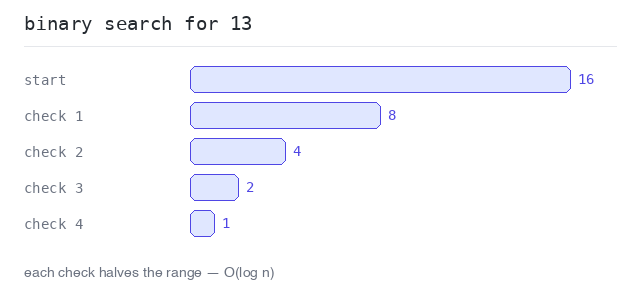
Binary search finds a value in a sorted array by always checking the middle element. If the middle is too small, the whole left half is thrown away; if too big, the right half. Each check halves the search range.
Two markers, $lo and $hi, hold the current range. The loop ends when the value is found or the range is empty.
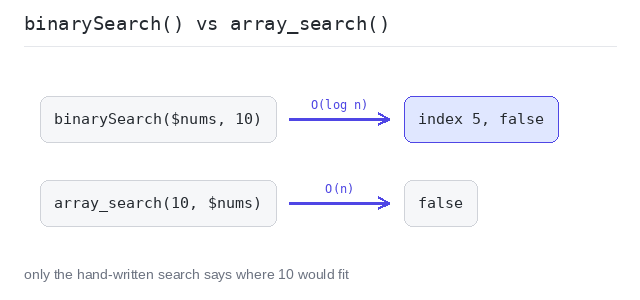
PHP has no ready-made binary search in its standard library. The built-in array_search() finds a value by scanning from the start — that is linear, O(n). On sorted data a hand-written binary search is the faster tool, and it can also tell you where a missing value would fit.
Binary search step by step
In a sorted array of 16 numbers, the search for 13 needs only 4 checks: the range shrinks 16 → 8 → 4 → 2 and lands on index 6. A linear search would have needed 7 steps here — and up to 16.
Output: PHP script
<?php

$nums = [1, 3, 5, 7, 9, 11, 13, 15, 17, 19, 21, 23, 25, 27, 29, 31];
$target = 13;
$steps = 0;

$lo = 0;
$hi = count($nums) - 1;
while ($lo <= $hi) {
  $steps++;
  $mid = intdiv($lo + $hi, 2);
  if ($nums[$mid] === $target) {
    echo "found $target at index $mid after $steps checks\n";
    break;
  }
  if ($nums[$mid] < $target) {
    $lo = $mid + 1;
  } else {
    $hi = $mid - 1;
  }
}
Binary search vs array_search()
binarySearch() finds 9 at index 4. The missing value 10 gives found: false and index 5 — the place where 10 would fit to keep the array sorted. array_search() answers too, but it scans the array linearly, and for the missing 10 it returns only false — no position.
Output: PHP script
<?php

function binarySearch(array $nums, int $target): array {
  $lo = 0;
  $hi = count($nums);
  while ($lo < $hi) {
    $mid = intdiv($lo + $hi, 2);
    if ($nums[$mid] < $target) {
      $lo = $mid + 1;
    } else {
      $hi = $mid;
    }
  }
  $found = $lo < count($nums) && $nums[$lo] === $target;
  return [$lo, $found];
}

$nums = [1, 3, 5, 7, 9, 11, 13, 15];

[$i, $found] = binarySearch($nums, 9);
echo "binarySearch 9  -> index: $i found: ", var_export($found, true), "\n";

[$i, $found] = binarySearch($nums, 10);
echo "binarySearch 10 -> index: $i found: ", var_export($found, true), "\n";

// array_search scans from the start: linear, O(n).
echo "array_search 9  -> ", var_export(array_search(9, $nums, true), true), "\n";
echo "array_search 10 -> ", var_export(array_search(10, $nums, true), true), "\n";
O(n log n): Sorting
O(n log n) sits between linear and quadratic and is the complexity of good sorting algorithms: the data is halved again and again (log n levels), and each level does a linear amount of work (n).
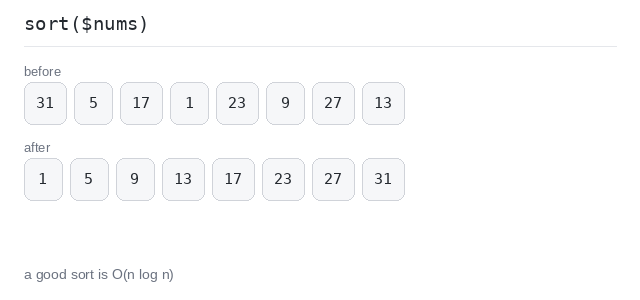
In PHP you rarely write a sort yourself — sort() is O(n log n). It takes the array by reference and sorts it in place: the array itself is changed, nothing needs to be assigned back. Sorting once, then binary-searching many times, is a common and fast pattern.
Sort an array
sort() orders the 8 numbers in place, in about 8 · log 8 = 24 steps — far fewer than the 64 a quadratic sort would use, and the gap widens fast as the array grows.
Output: PHP script
<?php

$nums = [31, 5, 17, 1, 23, 9, 27, 13];

sort($nums);

echo implode(", ", $nums), "\n";