Cut the Problem in Half
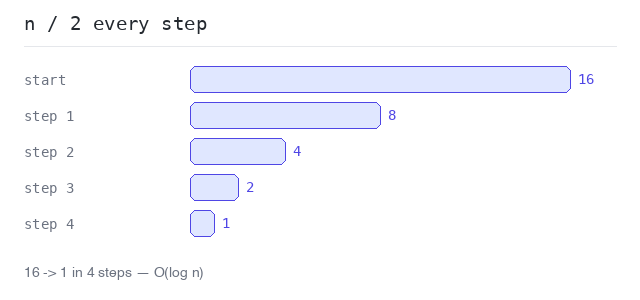
O(log n) means logarithmic time: every step cuts the remaining work in half. Because halving shrinks numbers so fast, doubling the input adds only one extra step.
16 elements need 4 halvings, 32 elements need 5, a million elements about 20, a billion about 30. That is why logarithmic algorithms feel instant even on huge data.
The classic example is binary search — but it only works on sorted data. Halving needs an order to know which half to throw away.
A Halving Loop
The simplest way to see O(log n) is a loop that divides n by 2 until it reaches 1. The number of rounds is the logarithm of n: for n = 16 the loop runs 4 times, because 2 · 2 · 2 · 2 = 16.
Halving until one remains
16 becomes 8, 4, 2, 1 — four steps. Doubling n to 32 would add just one more step.
Output: Go program and captured output
package main

import "fmt"

func main() {
  n := 16
  steps := 0

  for n > 1 {
    n = n / 2
    steps++
    fmt.Println("n is now", n)
  }

  fmt.Println("16 became 1 in", steps, "steps")
}
Binary Search
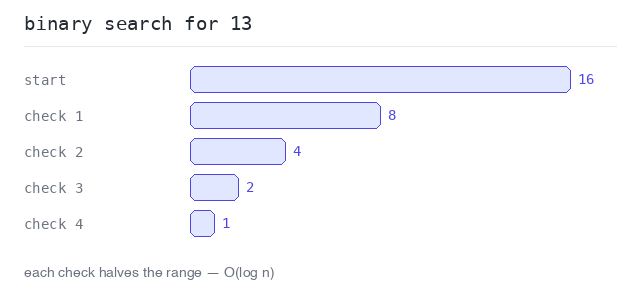
Binary search finds a value in a sorted slice by always checking the middle element. If the middle is too small, the whole left half is thrown away; if too big, the right half. Each check halves the search range.
Two markers, lo and hi, hold the current range. The loop ends when the value is found or the range is empty.
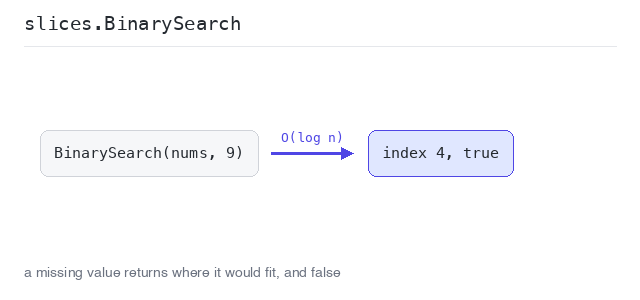
Go also ships this ready-made: slices.BinarySearch() returns the index and a bool. When the value is missing, the index is the position where it would be inserted.
Binary search step by step
In a sorted slice of 16 numbers, the search for 13 needs only 4 checks: the range shrinks 16 → 8 → 4 → 2 and lands on index 6. A linear search would have needed 7 steps here — and up to 16.
Output: Go program and captured output
package main

import "fmt"

func main() {
  nums := []int{1, 3, 5, 7, 9, 11, 13, 15, 17, 19, 21, 23, 25, 27, 29, 31}
  target := 13
  steps := 0

  lo, hi := 0, len(nums)-1
  for lo <= hi {
    steps++
    mid := (lo + hi) / 2
    if nums[mid] == target {
      fmt.Println("found", target, "at index", mid, "after", steps, "checks")
      break
    }
    if nums[mid] < target {
      lo = mid + 1
    } else {
      hi = mid - 1
    }
  }
}
Binary search with the slices package
slices.BinarySearch() finds 9 at index 4. The missing value 10 gives found == false and index 5 — the place where 10 would fit to keep the slice sorted.
Output: Go program and captured output
package main

import (
  "fmt"
  "slices"
)

func main() {
  nums := []int{1, 3, 5, 7, 9, 11, 13, 15}

  i, found := slices.BinarySearch(nums, 9)
  fmt.Println("index:", i, "found:", found)

  i, found = slices.BinarySearch(nums, 10)
  fmt.Println("index:", i, "found:", found)
}
O(n log n): Sorting
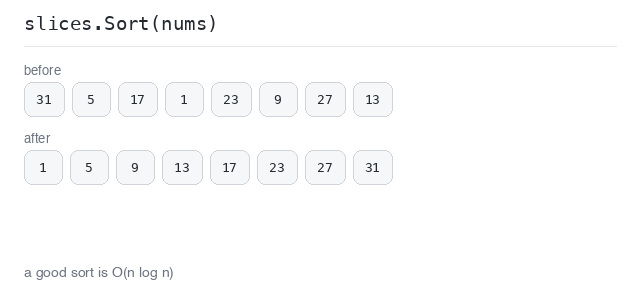
O(n log n) sits between linear and quadratic and is the complexity of good sorting algorithms: the data is halved again and again (log n levels), and each level does a linear amount of work (n).
In Go you rarely write a sort yourself — slices.Sort() is O(n log n). Sorting once, then binary-searching many times, is a common and fast pattern.
Sort a slice
slices.Sort() orders the 8 numbers in about 8 · log 8 = 24 steps — far fewer than the 64 a quadratic sort would use, and the gap widens fast as the slice grows.
Output: Go program and captured output
package main

import (
  "fmt"
  "slices"
)

func main() {
  nums := []int{31, 5, 17, 1, 23, 9, 27, 13}

  slices.Sort(nums)

  fmt.Println(nums)
}